Project Overview
An AI-powered exterior visualization web app that lets homeowners and contractors upload a house photo, choose new soffit, fascia, gutter, and downspout finishes, and generate a realistic before/after preview — all through a clean, step-by-step interface powered by Google Gemini and built with Next.js.
Key Features
- • Upload a house photo from your computer
- • Step-by-step selection flow with a progress stepper
- • Separate soffit styles (Pinhole & Hidden Vent)
- • Built-in texture libraries for exterior materials
- • Optional custom texture upload per category
- • AI image generation via server-side API route
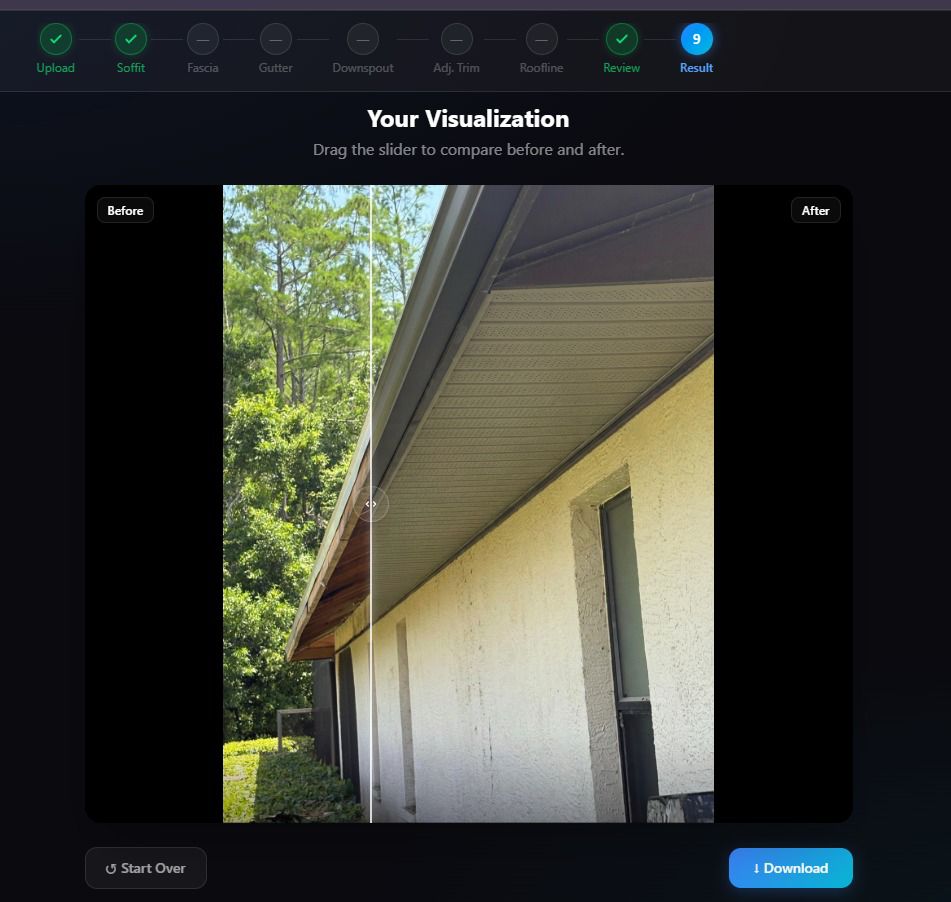
- • Before/after comparison slider
- • Download generated result image
Tech Stack
- • Next.js — App Router, API Routes
- • React — UI components
- • TypeScript — type safety
- • Tailwind CSS — styling
- • @google/genai — Gemini image generation
- • Node.js — server-side processing
How It Works
Upload
Upload a clear house photo (JPEG or PNG) from your device.
Select
Pick finishes for soffit, fascia, gutter, and downspout from texture libraries or upload your own.
Generate
The app sends images and selections to the Gemini API, which returns a photorealistic edit.
Compare
Drag the before/after slider to compare results and download the final image.
Project Screenshots
Main App Interface — Upload & Selection Flow
.jpeg)
Before / After Comparison Slider & Result
Exterior Categories
Soffit
Two distinct styles — Pinhole and Hidden Vent — with a built-in texture library for each. The app preserves the roofline and geometry while updating only this surface.
Fascia Board
Select from fascia texture options or upload a custom material reference. The prompt logic ensures windows, doors, and landscaping remain unchanged.
Gutter
Choose a gutter material texture from the built-in catalog or supply your own reference image for a custom look across the entire roofline.
Downspout
Visualize new downspout finishes that coordinate with the chosen gutter. Each category can be independently selected or skipped.
Technical Implementation
Generation Pipeline
- Browser reads & resizes the uploaded house image
- Built-in or custom textures loaded as reference images
- Frontend sends all data to Next.js API route (/api/generate)
- API builds a detailed prompt preserving house geometry
- Gemini returns edited image; displayed in before/after slider
Project Structure
frontend/
├── app/ — App Router pages
└── api/generate/ — Gemini route
├── components/ — UI steps
├── lib/ — prompt builder, textures
├── public/textures/ — built-in assets
└── types/ — TypeScript types
Code Sample — Prompt Builder
// lib/prompt-builder.ts
export function buildExteriorPrompt(selections: ExteriorSelections): string {
  const changes = [];

  if (selections.soffit) {
    changes.push(
      `Replace the soffit with ${selections.soffit.style} style ` +
      `using the reference texture provided.`
    );
  }
  if (selections.fascia) {
    changes.push(`Update the fascia board material to match reference.`);
  }
  if (selections.gutter) {
    changes.push(`Change gutters to the material shown in the texture.`);
  }
  if (selections.downspout) {
    changes.push(`Replace downspouts with the provided finish.`);
  }

  return `
    You are an expert architectural visualizer.
    Edit ONLY: ${changes.join(' ')}

    PRESERVE WITHOUT CHANGE:
    - Overall building shape and roofline geometry
    - All windows and doors
    - Surrounding landscaping and sky
    - Any other surfaces not listed above

    Return a photorealistic result.
  `;
}
Use Cases
Homeowners
Visualize exterior trim updates before committing to real-world purchases and installation costs.
Contractors
Present clients with realistic previews of material choices during the estimation and sales process.
Material Suppliers
Allow customers to try products virtually, improving purchase confidence and reducing returns.
Key Outcomes
What Was Achieved
- End-to-end AI image generation workflow integrated in Next.js
- Prompt engineering that strongly preserves original house geometry
- Flexible texture system with built-in catalog & custom upload
- Beginner-friendly codebase with clean project structure
Planned Enhancements
- Expanded texture catalog with real material suppliers
- Saved project history and shareable preview links
- Mobile-optimized camera capture flow
- Multi-region generation for large houses